responsible use of computers and internet technology
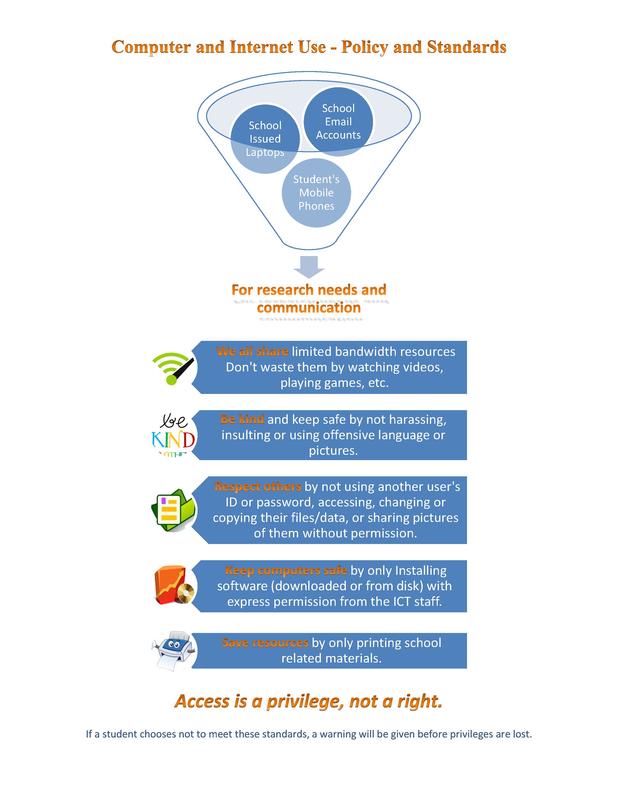
"access is a privilege, not a right.""For research needs and communication" |
Introduction:
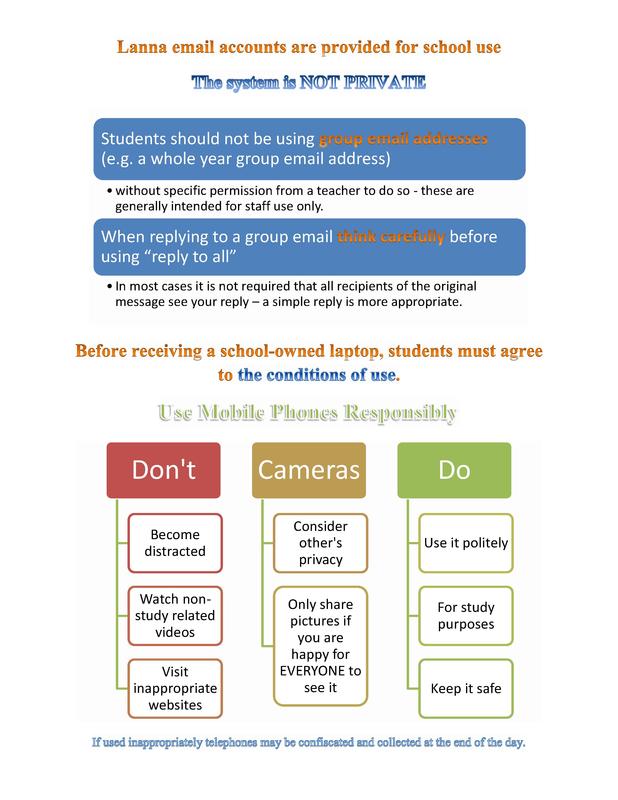
Each modern school or district has policies pertaining to the use of technology in and out of the classroom. These rules may be in the form of an Acceptable Use Policy (AUP) or a Responsible Use Policy (RUP), the difference between the two being the emphasis either on enforced restrictions (AUP) or thoughtful and informed use (RUP). Most institutions are now leaning toward RUPs because of the pervasiveness of technology in the lives of students. It is becoming increasingly difficult to police students use of devices and at the same time increasingly important for them to learn the "hows and whys" of personally responsible technology use.
|
Tech Policies Protocols and Procedures |

| ||
Just-in-Time Social/Ethical Lesson: Rules and Expectations |
Presentation about responsible and ethical technology use:
Click the button below for an online presentation to help students use classroom technology in a socially responsible and ethical way in accordance with the applicable guidelines and policies. Example lesson to teach socially responsible technology use:
The following is a “just-in-time” (JIT) lesson in the form of a provocative open ended question which allows an opportunity for students to “take a stand and justify their position” as outlined by Gregor Novak (2014) in an Edutopia article titled “Just-in-Time Teaching: An Interactive Engagement Pedagogy”. These questions can be answered to explore some of the social implications of technology use. The linked presentation (same as the button above) can help to explain some concerns and best practices. Example:
JUST-IN-TIME SOCIAL/ETHICAL LESSON: RULES AND EXPECTATIONS Situation: Susie has a crush on a boy at school named Bill. Bill doesn’t know it, so he asked another girl named Karen to go to a sports event with him. That made Susie jealous and she felt angry at Karen. One day, while using a computer at school, Susie opened a social networking site and noticed that Karen had left her account logged in, so instead of logging out of Karen’s account, she decided to upload a photo that she had taken of a group of students with her cell phone. Karen was in the photo next to a boy who was not Bill, and Susie cropped (edited) the photo and drew hearts around Karen and the other boy to change the context. After uploading it to Karen’s profile, Susie wrote a message on it, pretending to be Karen, that she knew would upset Bill and put in some bad language about the school to try and get Karen in trouble. Questions to consider: What do you think will happen to Karen and Bill? What about Karen’s parents or the school administration? Could this jealous act by Susie have long-lasting negative effects on her’s and the other people’s lives? if so, what kind of effects? * For ideas, please review the guidelines for responsible computer and internet use before composing your response. The presentation can be found through the following link: https://prezi.com/view/1agn9PMzug8Ac1ddy7o8/ (Safe, Responsible and Ethical Use button above) culturally responsive teachingAligned with principles of culturally responsive teaching:
The JIT lesson was created to initiate critical thinking about socially and ethically responsible use of Computer and Internet resources at the school and addresses the principles of culturally responsive teaching, displayed here in a Gary Howard Equity Institutes (2010) graphic: 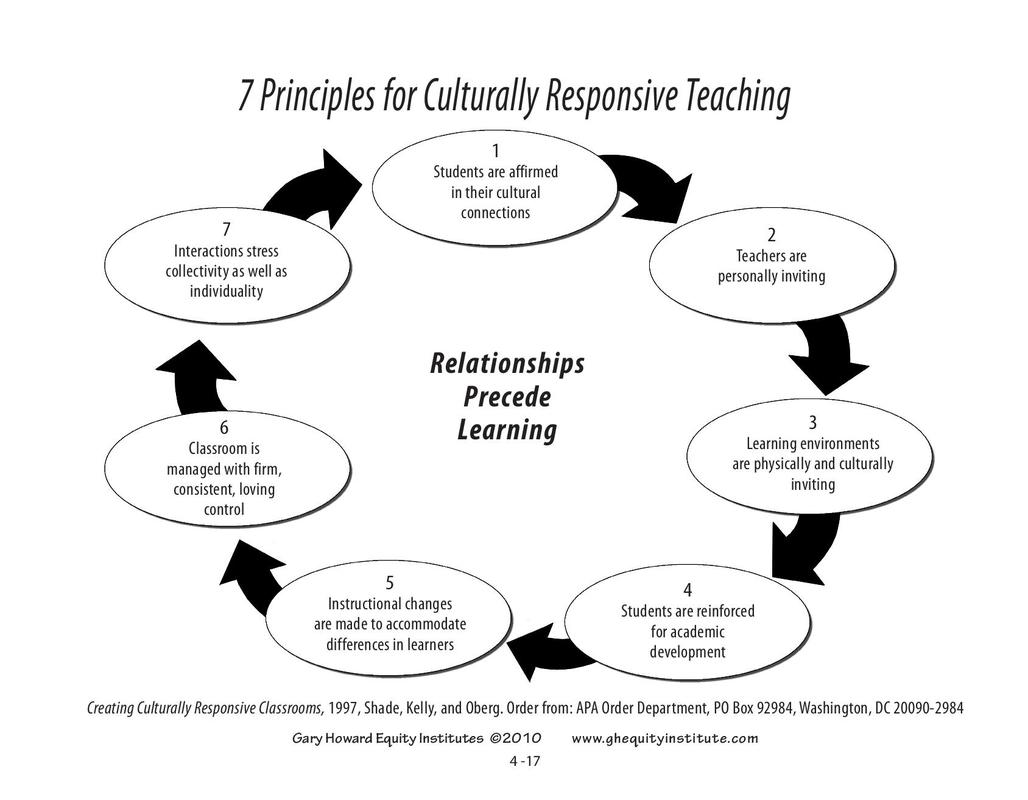
Click the image to download the original PDF
Based on accepted standards:
The online presentation linked above also addresses the ISTE standards (more information about these in the next section) for students pertaining to “Digital Citizenship” with regards to safety, security and ethical concerns. (ISTE Standards for students, 2017). More about ISTE standards in Section Two. |
Continue to Section Two for information about Determining the Credibility of online sources and the legalities of Copyright Compliance and Fair Use.
Technology Toolkit - navigation